Zipline Anchor
Place anchors to create high-speed travel ropes inspired by Apex Legends and Titanfall.
Usage
- Place two anchors within
maxZiplineLengthblocks (default 50) to create a rope between them. - Press Interact within
activationRadius(default 2.0) of an anchor, ormidRopeActivationRadius(default 1.5) of the rope itself, to start riding. - Press Interact again at any point to dismount.
All zipline settings can be adjusted in-game with /zephyrsettings.
Directional Input
The direction you travel is based on both your WASD keypresses and where you're looking.
- For horizontally skewed ziplines, you can look any direction and hold the movement key you want to head towards based on your current facing orientation.
- For vertically skewed ziplines, you can look towards the direction you want to head towards and choose whether you want to head towards it or not via pressing W or S.
Dismounting
Dismounting at any point during the ride launches you with dismountHorizontalForce (default 10.5) and dismountVerticalBoost (default 10.5), letting you transition smoothly into other movement mechanics like double jumps or dashes.
There is a limit to the amount of times you can mount a zipline per airborne period, determined by maxRideUses. The count resets when you land.
You can dismount from a zipline to jump on to a different zipline or change the direction you are riding your current zipline, creating windows for movement outplays or cool parkour mechanics.
See Zipline Settings for all configurable options.
Crafting
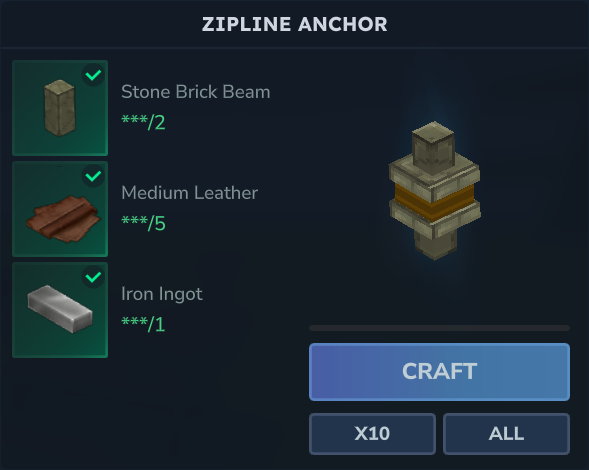
Crafting Recipe
- 2x Stone Brick Beams
- 5x Medium Leather
- 1x Iron Bar